
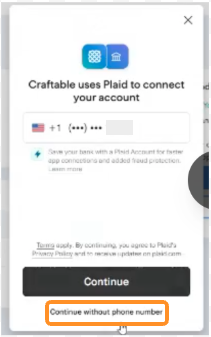
If you have previously used Plaid — even in a different app — it may recognize your phone number and automatically link your last-used bank account without giving you the chance to choose. To avoid this, select 'Continue without phone number' when prompted. This will let you search for your bank and manually select the correct account for each store.
Step-by-Step: ACH Online Banking Through Plaid - Account Selection
Follow these steps when setting up ACH payment per store, especially for multi-store setup:
Step 1: Navigate to Payment Setup
- Log into app.craftable.com
- Select the specific store location you are setting up payment for (top-left store selector)
- Click your username (top right) → Manage Subscription → Set Up Payment Method → Set Up ACH with Online Banking
Step 2: When Plaid Launches — Watch for Phone Number Prompt
- If Plaid shows a phone number pre-filled or asks to confirm a phone number:
- ⚠️ Do NOT proceed with the phone number if the customer has previously used Plaid.
- Click "Continue without phone number" instead.
- This prevents Plaid from pulling a cached/default account and forces a fresh bank search. ->
Step 3: Search and Select the Correct Bank Account
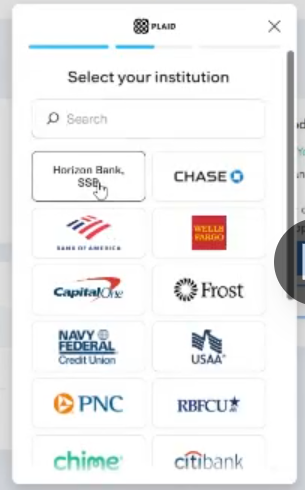
- Search for the bank by name (e.g., "Horizon")
- Enter credentials for that bank
- When multiple sub-accounts are shown (e.g., checking accounts for different LLCs), explicitly select the account designated for that store
- Confirm and complete verification
Step 4: Repeat Per Store
- Return to the store selector and switch to the next location
- Repeat Steps 1–3 for each store independently
- Do not assume that completing Plaid for one store carries over correctly to others