
Insights is an AI-powered Analytics tool that automatically surfaces the most important opportunities in your operation — ways to increase revenue, reduce waste, and improve performance — without you having to dig through reports to find them.
Why it matters: Replacing hours of digging through reports and low-confidence correlations, Insights continuously analyzes sales, labor and inventory data and surfaces the highest-impact findings to you as a prioritized, plain-language to-do list — each with an estimated dollar impact and recommended actions. Hours of analysis now replaced with just a few minutes of review.
BETA: Insights is a beta feature. AI can make mistakes, so always double-check cited data before acting. Feature access and availability may change in future updates.
How to access Insights
- From the Analytics platform, find the new Operator AI section in the left sidebar (accompanied by a BETA badge), and then select Insights.
Note: Insights must be enabled for your store, and your user must have the “View Operator AI” permission. If you don’t see the page, contact your account administrator.
What you'll see
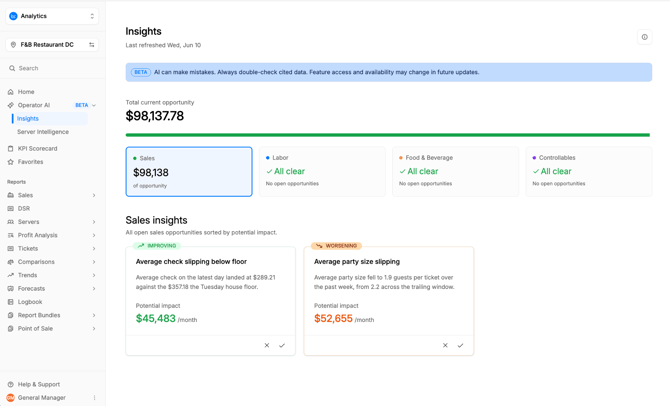
The page presents a grid of insight cards, ordered by impact, so the most valuable opportunities appear first. A “Last refreshed” timestamp at the top of the page displays when the insights were last generated.
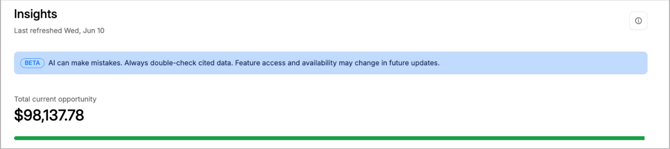
Total opportunity
This represents the sum of opportunities available based on insights across all four represented categories: Sales gaps, Labor costs, Food & Beverage costs, and Controllables. The colored bar beneath the “Total current opportunity” value dynamically shifts as you cycle between the four categories, with the bolded color quantifying the potential contribution from the currently selected category.
Insight categories
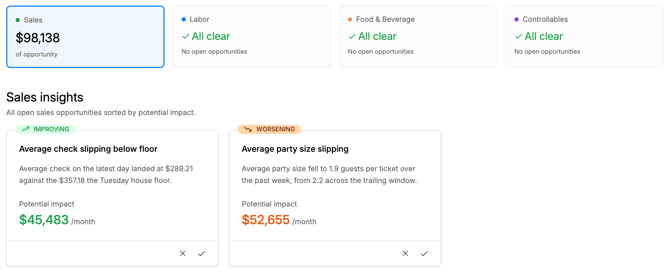
Insights are divided across four categories - Sales gaps, Labor costs, Food & Beverage costs, and Controllables - with each tile displaying a high level summary of financial opportunity residing within that category. Selecting a category tile will display all insights included in that category, with Sales selected by default.
Reading an insight card
Insight cards will populate underneath the category tiles, where applicable, per the selected category. Each insight card displays the essentials at a glance:
- Headline — a one-line summary of the finding.
- Description — a short explanation of what’s happening and why it matters.
- Potential Impact — the estimated monthly dollar value of acting on the insight.
- Card dismissal / action — Each insight card has the ability to be marked as “no action taken” (selecting the “X”) or as “actioned” (selecting the checkmark).
Note: It is highly encouraged to document where action was / was not taken so that any incremental impact can be accurately recorded, allowing a user to discern which actions have made a positive impact on revenue or margin versus those which have not.
- Feedback — thumbs-up / thumbs-down buttons to tell us whether the insight was useful.
Note: insight tiles may occasionally display an “Improving” or “Worsening” badge on the top left of the tile. This badge appears on insight tiles which have been previously displayed but have since improved or declined.
Insight details (click-through drawer)
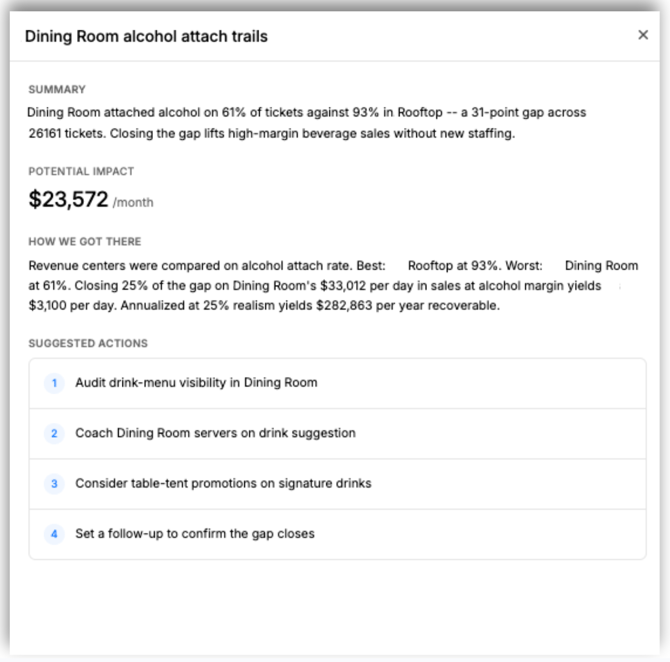
Clicking on an insight card opens a drawer on the right side of the screen. The drawer keeps you on the page while giving you the full story behind the insight.
Inside the drawer you'll typically find:
- Headline — a one-line summary of the finding.
- Summary — a fuller description of the finding.
- Potential impact — the monthly financial opportunity.
- Evidence — some insights have an accompanying evidence section, occasionally displaying a visual for deeper user discernment.
- How we calculated this — the data and logic behind the number, for transparency.
- Suggested actions — suggested actions / next steps to recapture the opportunity.
Tips
- Work the list top-down — cards are already prioritized by impact.
- Dismiss or document actions as they occur - doing so will directly improve the quality and relevance of future insights, as well as build a record of which actions have had positive impact to revenue or margin.
- Check the “Last refreshed” time so you know how current the analysis is.